

If you have started making use of the macOS Sonoma 14, you would have noticed that when accessing websites on Safari web browser in Private Mode, when you move to the Private window it gets locked with a message "Private Browsing Is Locked" and you are expected to enter the password or make use of the Touch ID.
If you do not want the Safari private window to be locked, then follow the below steps.
- Step 1: Be on the Safari Window.
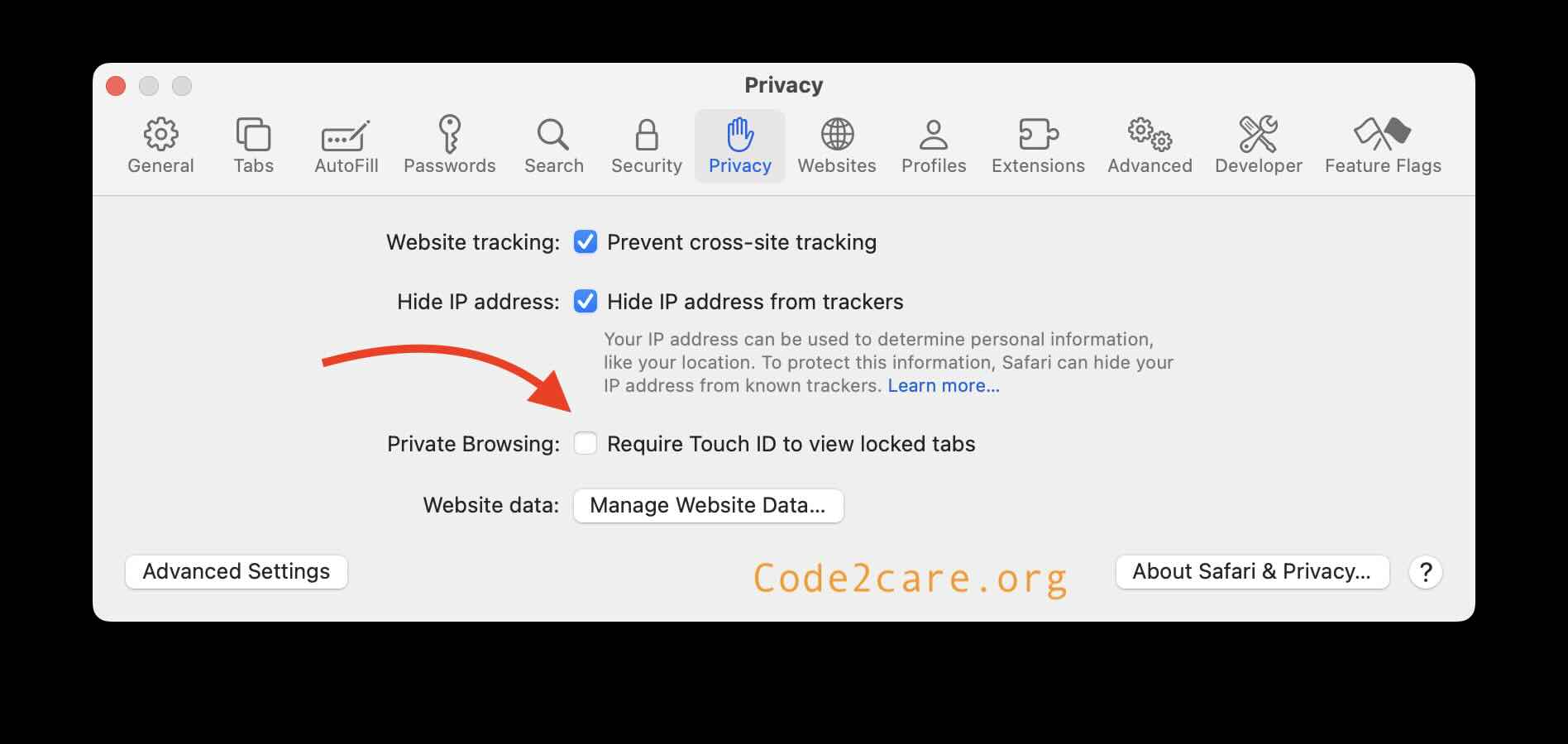
- Step 2: Now go to Menu: Safari -> Settings...
- Step 3: Now go to Privacy tab and uncheck "Require Touch ID to view locked tabs"
- Step 4: Close the Advanced window.
Provide Feedback For This Article
We take your feedback seriously and use it to improve our content. Thank you for helping us serve you better!
😊 Thanks for your time, your feedback has been registered!
Comments & Discussion
Facing issues? Have questions? Post them here! We're happy to help!