
Highlighting the current line where the cursor is in Notepad++ can be useful to improve readability especially when you're working with large files, one can be easy to lose track of your current position within the file.
Highlighting the current line can help you quickly identify where you are in the file, making it easier to read and navigate.
You can enable this option by going to Settings menu option and going to Preferences and select Editing tab.
Now all you need to do is check the radio box "Highlight Background" under the "Current Line Indicator" section.
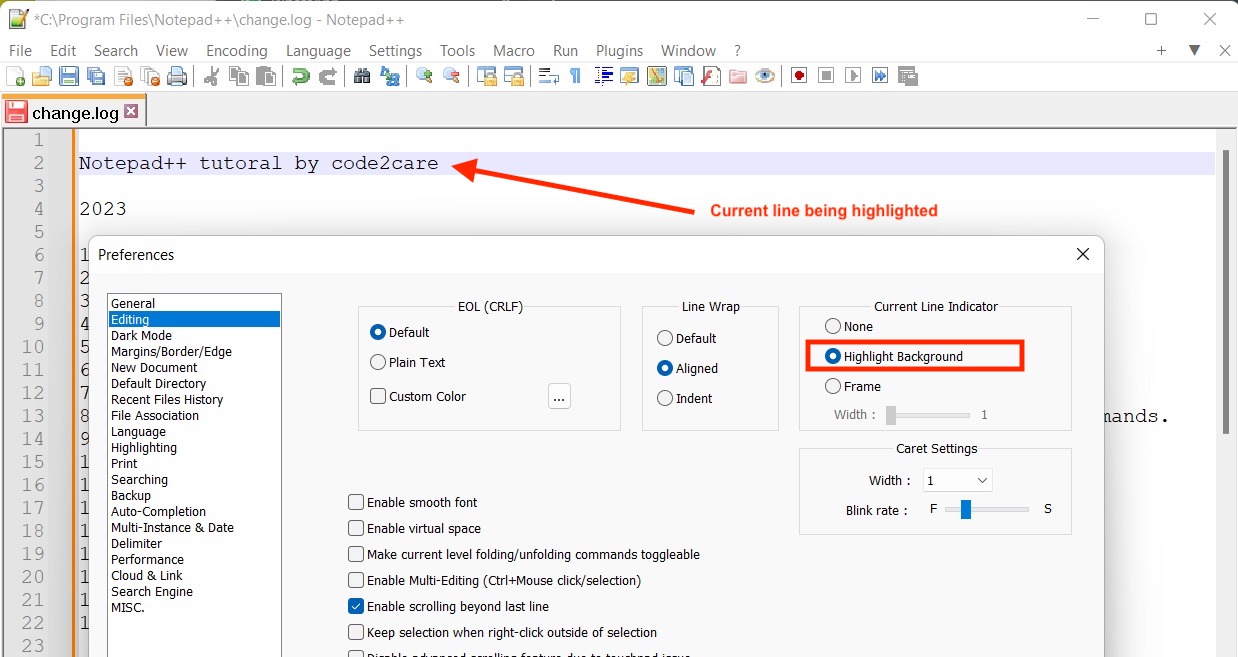
Highlighting the current line in Notepad++ can help you work more efficiently and effectively, making it a useful feature for developers, writers, and anyone who frequently works with text files.
Provide Feedback For This Article
We take your feedback seriously and use it to improve our content. Thank you for helping us serve you better!
😊 Thanks for your time, your feedback has been registered!
Comments & Discussion
Facing issues? Have questions? Post them here! We're happy to help!