
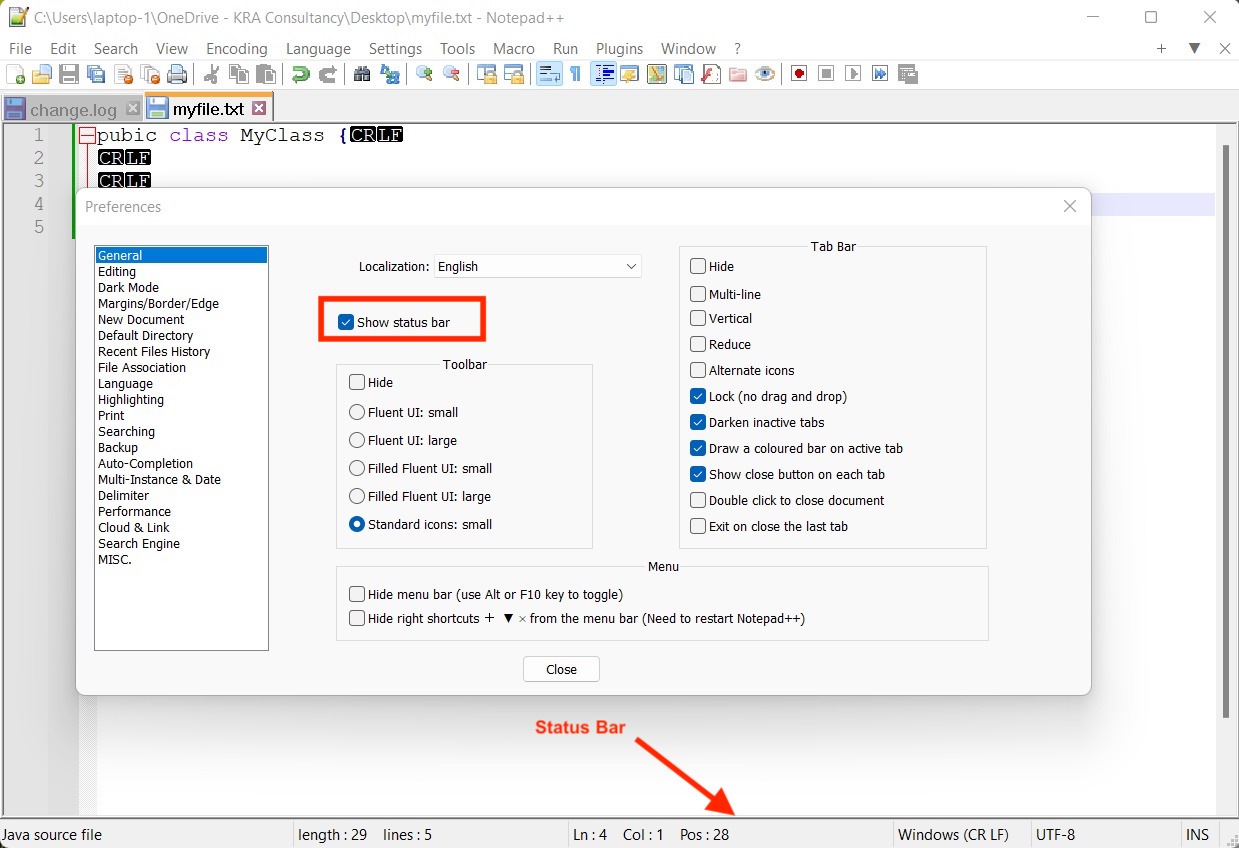
In Notepad++ the status bar is a very useful tool that displays information about the files or text you are working on. It is located at the bottom of the application window and provides information on a range of different parameters such as
- The type of text - Normal (txt) or the language such as C, C++, Java, Python, etc.
- The length of file - Total count of characters in the file/tab
- Lines - Shows the number of lines in a file/tab.
- Postion of the cursor - Where the cursor is at currently.
- End of Line - Details about CR/LF CRLF EOL encoding of the file - (Windows, Mac or Linux)
- File Encoding - Such as UFT-8, UTF-16, BOM etc
- Selected Text - When the text is selected, details about the text are selected.
This status bar is visible by default, but if somehow you are unable to see it, follow the below steps to get it back.
- Go to Menu: Settings -> Preferences
- Now make sure "Show Status bar" is selected.
Provide Feedback For This Article
We take your feedback seriously and use it to improve our content. Thank you for helping us serve you better!
😊 Thanks for your time, your feedback has been registered!
Comments & Discussion
Facing issues? Have questions? Post them here! We're happy to help!