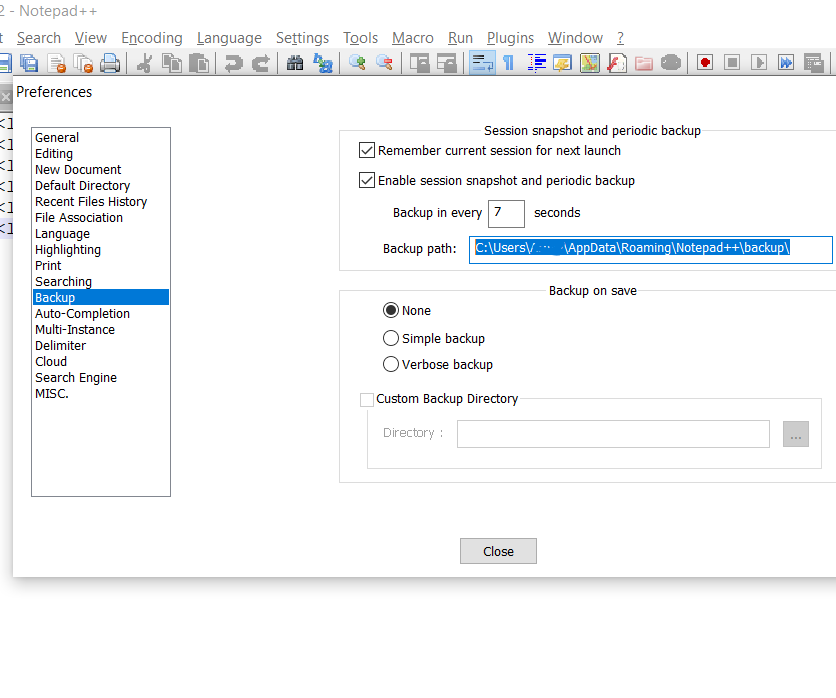
The very best advantage of using Text Editors such as Notepad++ is that it periodically (mostly by default every 7 seconds) backs up your files somewhere, if you are wondering where exactly Notepad++ stores these files, well you can find it out go going to Preferences -> Backup -> Backup path,
How to locate Notepad++ file Backup path?
Open Notepad++,
Go to Menu: Settings -> Preferences...,
Now go to Backup, look for Backup path: under Session Snapshot and periodic backup,
Copy that path and open in explorer, you would see all the unsaved tab files example: C:\Users\code2care\AppData\Roaming\Notepad++\backup, file new 1@2020-06-28_002515
Notepad++ Unsaved file backup location
⚡️ So if you want to recover your unsaved tabs files, you can go to this location and recover them!
Comments & Discussion
Facing issues? Have questions? Post them here! We're happy to help!
Provide Feedback For This Article
We take your feedback seriously and use it to improve our content. Thank you for helping us serve you better!
Thanks for your feedback! If you have time, please provide details by selecting options below.
😊 Thanks for your time, your feedback has been registered!

Comments & Discussion
Facing issues? Have questions? Post them here! We're happy to help!