
There is no built-in support for files with .rar extensions on the Mac running on macOS. So if you have a *.rar file downloaded from the web, or shared with you by your office colleague or friend, you will need an application or a binary that will extract RAR files.
Let us take a look at 2 different ways you can extract rar files,
1. Install rar formula using Homebrew
- Open Terminal App,
- Type the below command,
% brew install rar
==> Downloading https://www.rarlab.com/rar/rarmacos-arm-612.tar.gz

==> Installing Cask rar
==> Moving Generic Artifact 'default.sfx' to '/opt/homebrew/lib/default.sfx'
==> Moving Generic Artifact 'rarfiles.lst' to '/opt/homebrew/etc/rarfiles.lst'
==> Linking Binary 'rar' to '/opt/homebrew/bin/rar'
==> Linking Binary 'unrar' to '/opt/homebrew/bin/unrar'
🍺  rar was successfully installed!
Note: If you get error "zsh: brew command not found" then you need to install homebrew
RAR will be installed from https://www.rarlab.com
- To extract a file use command unrar e filename.rar
Example:% unrar e myDir.rar
2. Install tools from the Mac App Store
There is a lot of rar file archiver and unarchive software that you can get from the official App Store on Mac. Here are a few of them you can try,
- Unzip - RAR ZIP 7Z Unarchiver: https://apps.apple.com/in/app/unzip-rar-zip-7z-unarchiver/id1537056818?mt=12
- The Unarchiver: https://apps.apple.com/in/app/the-unarchiver/id425424353?mt=12
- RAR Extractor - Unarchiver: https://apps.apple.com/in/app/rar-extractor-unarchiver/id646295438
Let us take a look at how to install The Unarchiver app on the Mac,

- Open App Store by going to Apple Menu -> App Store... (or Spotlight Search),
- Now Type in search "The Unarchiver",
- Click on the Get icon (you may be asked to enter your Apple ID Password or use Touch ID),
- Click Open once installed.
- Make sure to select the RAR options when the Preferences options come up.

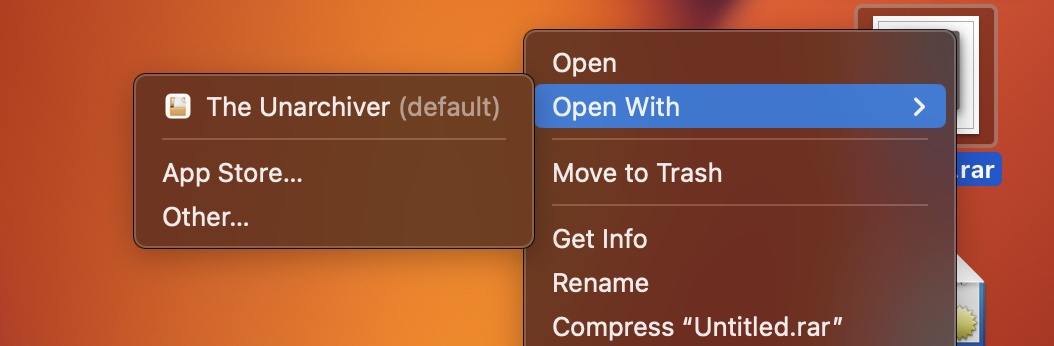
To use this app simply right-click on the rar extension file and select Open With -> The Unarchiver
Provide Feedback For This Article
We take your feedback seriously and use it to improve our content. Thank you for helping us serve you better!
😊 Thanks for your time, your feedback has been registered!
Comments & Discussion
Facing issues? Have questions? Post them here! We're happy to help!