
You must be familiar with clear command to clear the text on the Terminal screen on macOS, do you know there is a keyboard shortcut as well to the same operation.
How to clear screen of Terminal using Keyboard?
Press Command + L - this will clear the console.
Note: Unlike clear command they keyboard shortcut clears one command at a time. It will not clear the whole screen.
Example:code2care@mac ~ % pwd
/Users/code2care
code2care@mac ~ % who
code2care console Jun 14 12:20
code2care ttys000 Jun 27 14:20
code2care@mac ~ % date
Sun Jun 27 14:24:22 GMT 2021
code2care@mac ~ % Press: Command + L
code2care@mac ~ % pwd
/Users/code2care

code2care@mac ~ % who
code2care console  Jun 14 12:20
code2care ttys000  Jun 27 14:20

code2care@mac ~ %
Press: Command + L
code2care@mac ~ % pwd
/Users/code2care

code2care@mac ~ %
Press: Command + L
code2care@mac ~ %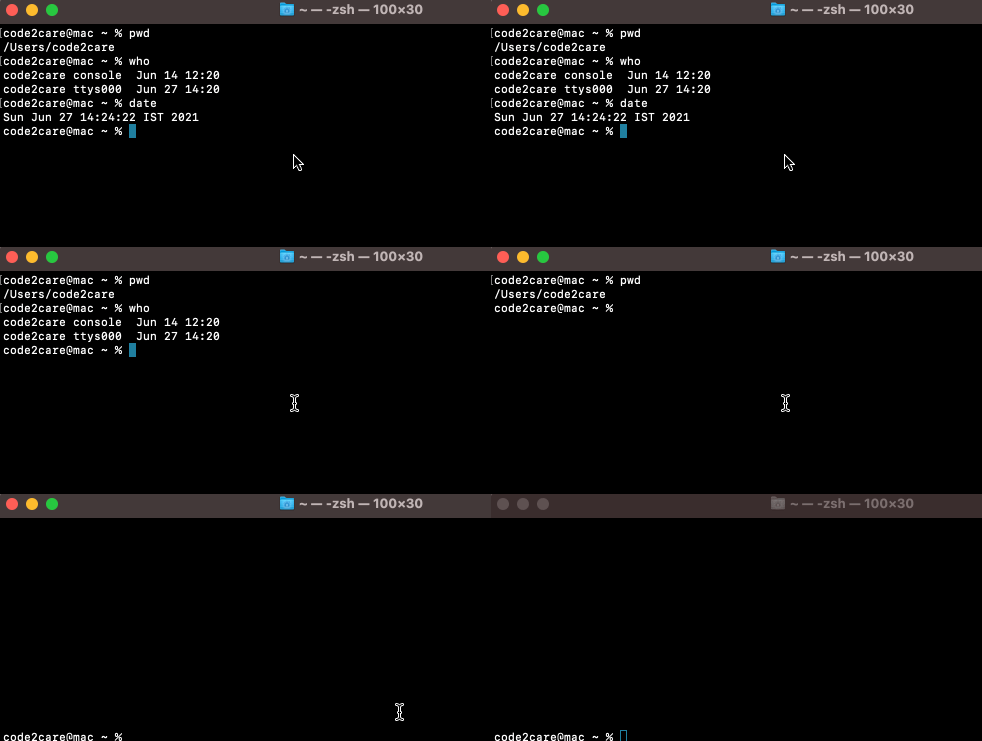
Have Questions? Post them here!
Provide Feedback For This Article
We take your feedback seriously and use it to improve our content. Thank you for helping us serve you better!
😊 Thanks for your time, your feedback has been registered!
Comments & Discussion
Facing issues? Have questions? Post them here! We're happy to help!