
% git push
Password for 'https://ghp_1aXuIxxxx4wy2sjdvxxxxxxxxxxxx3ZFHfZ@github.com':
remote: Support for password authentication was removed on August 13, 2021.
remote: Please see https://docs.github.com/en/get-started/getting-started
 -with-git/about-remote-repositories#cloning-with-https-urls
for information on currently recommended modes of authentication.
fatal: Authentication failed for 'https://github.com/user/mynotes.git/'
If you were trying to push a branch up to origin GitHub and you received, the above error when you were asked to authenticate with a password, then it's most likely that your Personal access tokens has expired.
Solution:- Login to your GitHub profile,
- Go to Settings -> Developers Settings,
- Now checkout Personal access tokens and see if your token has expired,
- If yes create a new one.
- And start using it instead: Set new Token using command line.
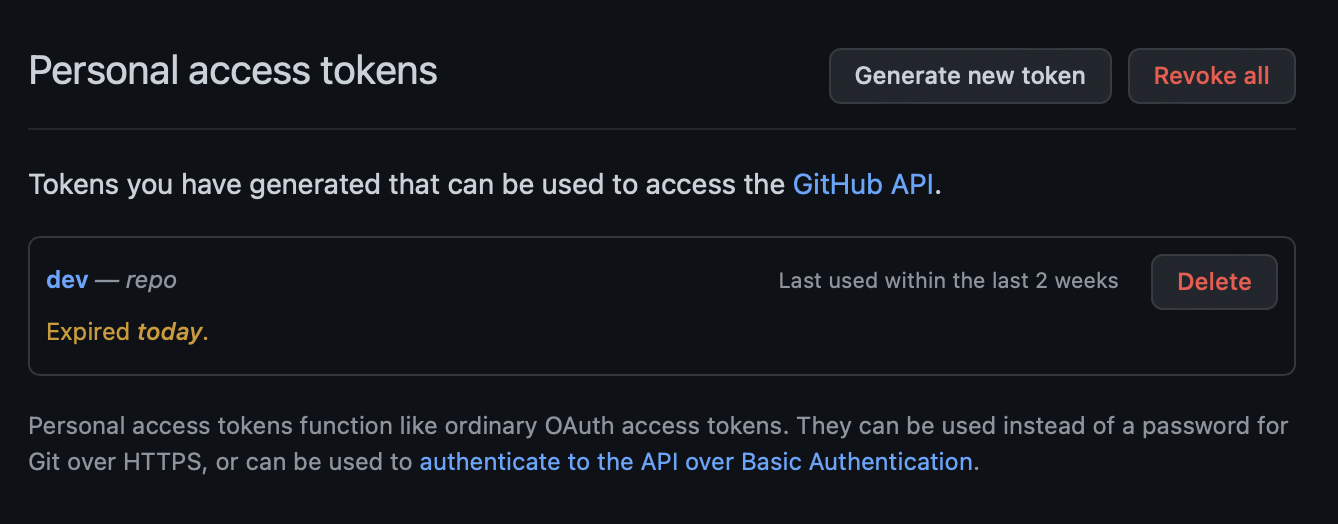
As the page states: ✏️ Personal access tokens function like ordinary OAuth access tokens. They can be used instead of a password for Git over HTTPS, or can be used to authenticate to the API over Basic Authentication.
Provide Feedback For This Article
We take your feedback seriously and use it to improve our content. Thank you for helping us serve you better!
😊 Thanks for your time, your feedback has been registered!
Comments & Discussion
Facing issues? Have questions? Post them here! We're happy to help!