
If you try to run a git command to add a file to stage area or commit your current state files into your local branch on the terminal and you get the fatal error "not a git repository",
Reasons:- The most likely reason is that you are not in a git directory, do a pwd and confirm.
- If this is supposed to be a new repository, then go a git init to initialize the directory as a git repo.
- Check if the directory has a .git folder in it (ls -la).
- If this directory you are in is supposed to be a new git project then run git init
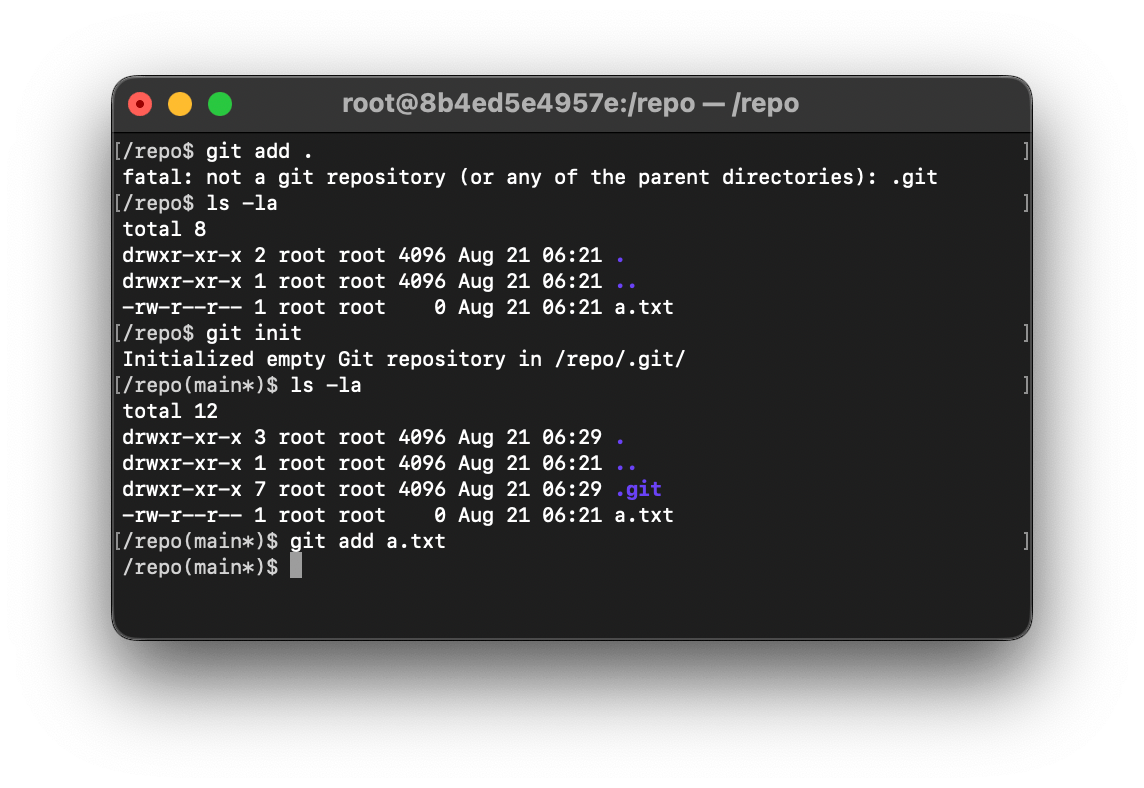
As you may see in the above screenshot when I did a git add, I got the fatal error saying the current directory is not a git repository, when I did a ls -la, there is not .git folder, and for me, it was supposed to be a new git repo, so I did git init and then tried the git add command and it worked like a charm.
Happy coding!
Provide Feedback For This Article
We take your feedback seriously and use it to improve our content. Thank you for helping us serve you better!
😊 Thanks for your time, your feedback has been registered!
Comments & Discussion
Facing issues? Have questions? Post them here! We're happy to help!