
You can apply column formatting to customize the display of fields in Modern SharePoint lists and libraries view by using JSON. The column formatting does not change the actual data in the list item or file, it only changes how the value is displayed to users in the user interface.
⛔️ Longer values truncated in SharePoint Modern List View experience

✔️ How to wrap long text values in SharePoint Modern experience for custom list
- Navigate to your modern SharePoint list view.
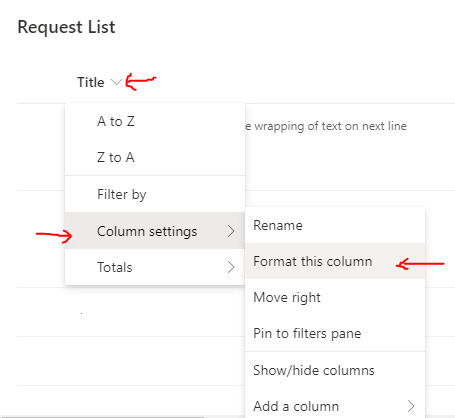
- Click on the column name.
- Click Column Settings.
- Click Format this column.
- A pane will open from right side of screen with title 'Format [Column Name] column'. Make sure 'Format columns' tab is selected and your column is selected in Choose Column drop down.
- Scroll to bottom and click Advanced mode.
- Copy and paste this JSON in the text box "Paste or type your column-formatting JSON here."
- Click Preview to check the display changes and make adjustments.
- Once comfortable, click Save.
- The changes will be reflected on the view.
- You can use similar JSON approach for formatting other column values.
{ "$schema": "https://developer.microsoft.com/json-schemas/sp/column-formatting.schema.json",
  "elmType": "div",
  "style":{
        "white-space":"wrap"
  },
  "txtContent": "@currentField"
}
CSS style for wrapping text --> "white-space":"wrap"

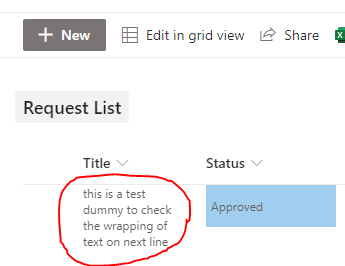
⭐ Note that the JSON formatting changes only the display of column values on the UI. The column headers cannot be controlled and wrapped.
⭐ The JSON formatting changes apply to Grid View editing as well.
Comments:
- how to wrap the values for a people picker column? it shows [object].
14 Dec 2020 23:56:20 GMT
- I have a SPO list with some field headings that are long. Is there a way to force word wrapping only on the header?
13 Dec 2020 04:43:13 GMT
- Can I append values from different columns and show them as a hover card using JSON formatting ? including calculated fields
10 Dec 2020 16:12:34 GMT
- How to make a column read-only in custom SharePoint Online List view in quick edit?
10 Dec 2020 11:32:11 GMT
- Further comments disabled!
Comments & Discussion
Facing issues? Have questions? Post them here! We're happy to help!
Provide Feedback For This Article
We take your feedback seriously and use it to improve our content. Thank you for helping us serve you better!
😊 Thanks for your time, your feedback has been registered!