
You can perform basic CRUD operations on SharePoint lists, libraries, sites using REST API's.
Here is an example with sample code to create list item with REST endpoint.
The post covers steps to test the query from Postman. Once tested successfully, it can be used with your code (C#, Python, Java, Power Automate, SPFX, etc.).
⚡️ Create SharePoint list item from Postman
Assumptions for this example, you have configuration like below.- SharePoint Tenant Name = c2c
- SharePoint Site Name = SPDev
- SharePoint List Name = Projects
- SharePoint List Columns = Title, Comments
- SharePoint Add-in App is already configured with Client Id and Secret for accessing externally, refer below reference articles.
o Steps to generate SharePoint Client Id and Secret
o Steps to test SharePoint REST API from Postman
- Launch the Postman tool.
- Select POST Method for Request (refer image below).
- In the "Enter request URL" textbox, enter URL in this format.
- Navigate to the Header section and add below 3 KEY's (steps to generate Token)
- Navigate to the Body section and select raw/JSON. Copy-paste below JSON code which will create a ListItem in SharePoint List.
- Click Send button to submit the request.
- If all configurations are correct, you will see a success response with Status "201 Created".
- Navigate to the SharePoint list in order to confirm the list item is created successfully based on the values passed in JSON.
FORMAT --> https://[Tenant].sharepoint.com/sites/[SiteName]/_api/web/lists/GetByTitle('[ListName]')/items
EXAMPLE --> https://c2c.sharepoint.com/sites/SPDev/_api/web/lists/GetByTitle('Projects')/items
| Authorization | Bearer [Token] |
| Accept | application/json;odata=verbose |
| Content-Type | application/json;odata=verbose |
{ "__metadata": {"type": "SP.Data.ProjectsListItem"},
 "Title": "New Title 1",
"Comments": "This entry is created from Postman"
}

⛏️ Troubleshooting
You may face some errors/exceptions while working with SharePoint REST API's using Postman, here are solutions to some common problems.
403 Forbidden - UnauthorizedAccessException - Access denied
<?xml version="1.0" encoding="utf-8"?>
<m:error xmlns:m="http://schemas.microsoft.com/ado/2007/08/dataservices/metadata">
    <m:code>-2147024891, System.UnauthorizedAccessException</m:code>
    <m:message xml:lang="en-US">Access denied. You do not have permission to perform this action or access this resource.</m:message>
</m:error>
Solution - You are missing the Authorization Key in Headers, Postman used the bearer token to connect to SharePoint. Refer earlier steps to add Authorization key in Header section and how to generate the token.
400 Bad Request - InvalidClientQueryException - An unexpected 'PrimitiveValue' node was found
{
    "error": {
        "code": "-1, Microsoft.SharePoint.Client.InvalidClientQueryException",
        "message": {
            "lang": "en-US",
            "value": "An unexpected 'PrimitiveValue' node was found when reading from the JSON reader. A 'StartObject' node was expected."
        }
    }
}
Solution - Most probably, your JSON is not well formed. Check for additional or missing braces, quotes. There are many online tools available to validate JSON, use them to fix the JSON code before using.
400 Bad Request - InvalidClientQueryException - The property '__metadata' does not exist
{
    "error": {
        "code": "-1, Microsoft.SharePoint.Client.InvalidClientQueryException",
        "message": {
            "lang": "en-US",
            "value": "The property '__metadata' does not exist on type 'SP.Data.ProjectsListItem'. Make sure to only use property names that are defined by the type."
        }
    }
}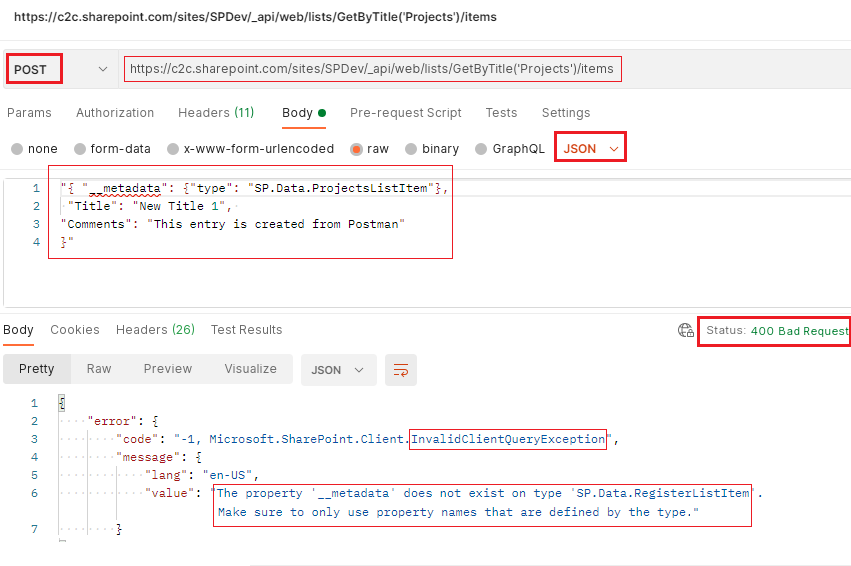
Solution - Ensure that the Content-Type request header value is application/json;odata=verbose and not application/json.
Now you can use this code in SPFX web part (modern), or JQuery + HTML (classic), or may be even directly embed in Content Editor web part / Script Editor web part.
Try to extend the basic code to build more complex queries like adding a lookup value, adding user in a people picker field, add values to Managed Metadata columns, etc.
Have Questions? Post them here!
Provide Feedback For This Article
We take your feedback seriously and use it to improve our content. Thank you for helping us serve you better!
😊 Thanks for your time, your feedback has been registered!
Comments & Discussion
Facing issues? Have questions? Post them here! We're happy to help!