
I just installed Eclipse 2021-03 version on my computer and one thing I noticed was it being set up to a Dark theme by default. I am pretty much used to the Classic Theme, so here is how I set the theme back to the default one,
- Go to Windows (Eclipse in case of macOS) menu option,
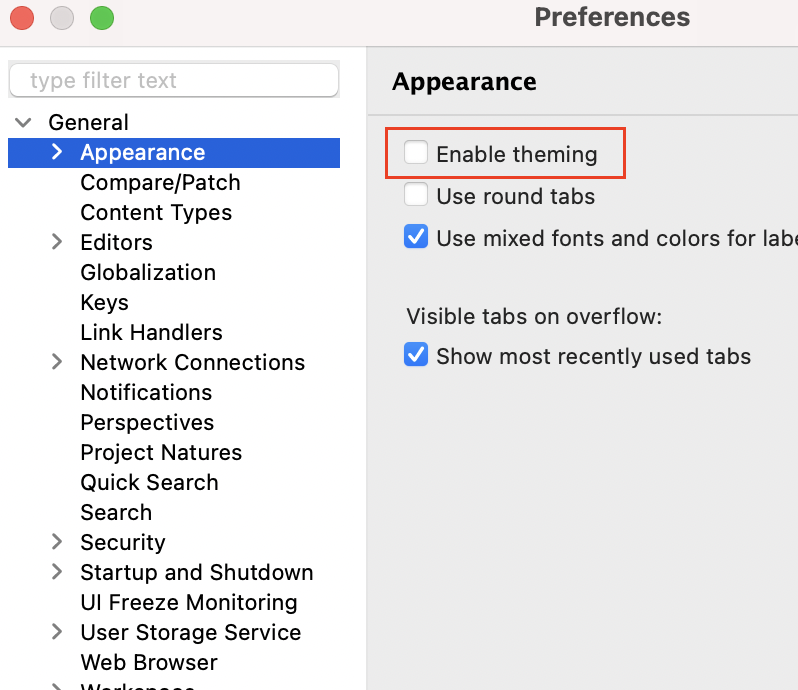
- Go to General -> Apperances,
- Now uncheck - "Enable theming"
- You will see a message saying "Theme change: A restart is required for the theme to take full effect."
- Click on the restart hyperlink.
- When you restart eclipse the theme should be back to the classic one.

Have Questions? Post them here!
Provide Feedback For This Article
We take your feedback seriously and use it to improve our content. Thank you for helping us serve you better!
😊 Thanks for your time, your feedback has been registered!
Comments & Discussion
Facing issues? Have questions? Post them here! We're happy to help!