
If you have a list in Python and you want to search to see if a particular element is present in the list, you can make use of the one of the following three ways,
1. Using the "in" and "not in" operator
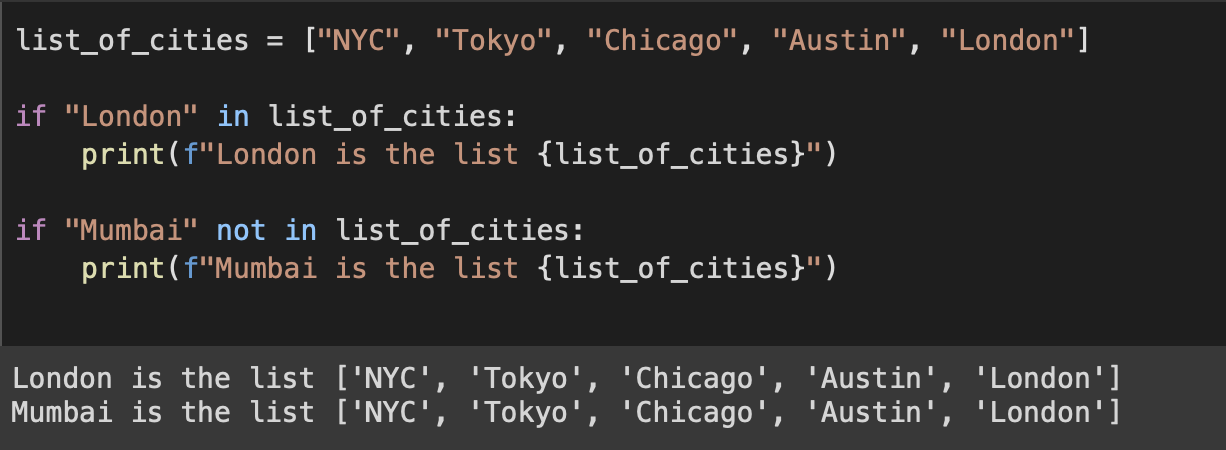
Example:list_of_cities = ["NYC", "Tokyo", "Chicago", "Austin", "London"]
if "London" in list_of_cities:
print(f"London is the list {list_of_cities}")
if "Mumbai" not in list_of_cities:
print(f"Mumbai is not the list {list_of_cities}")London is the list ['NYC', 'Tokyo', 'Chicago', 'Austin', 'London']
Mumbai is not the list ['NYC', 'Tokyo', 'Chicago', 'Austin', 'London']
2. Using the index() method
Example:my_list = ["Apple", "Mango", "Banana", "Grapes"]
try:
index = my_list.index("Mango")
print("Mango is at index", index)
except ValueError:
print("Mango is not in the list")Mango is at index 1
Its better to handle ValueError as if the element you are looking for is not found you get this error.
---------------------------------------------------------------------------
ValueError                                Traceback (most recent call last)
<ipython-input-42-3b37ee759fe2> in <cell line: 3>()
      1 my_list = ["Apple", "Mango", "Banana", "Grapes"]
      2
----> 3 index = my_list.index("Orange")
      4 print("Mango is at index", index)

ValueError: 'Orange' is not in list
3. Using the count() method
Example:my_list = [24,21,12,45,24,12,45,23]
if my_list.count(10) > 0:
print("10 is found in my_list")
else:
print("10 is not found in my_list") 10 is not found in my_list


HashTags: #searchAListPython #pythonFindInList #listSearchPython #pythonFindElementInList #pythonFindItemInList
References:
- https://docs.python.org/3/library/array.html?highlight=index#array.array.index- https://docs.python.org/3/library/array.html?highlight=index#array.array.count
Provide Feedback For This Article
We take your feedback seriously and use it to improve our content. Thank you for helping us serve you better!
😊 Thanks for your time, your feedback has been registered!
Comments & Discussion
Facing issues? Have questions? Post them here! We're happy to help!