
If you recently installed nvm - Node Version Manager package using brew and when you run the nvm command you get - zsh: command not found: nvm on your macOS system. Well, the reason is you have not set the zsh profile file to locate the installed nvm package.
Let's see what we see when we install nvm using the command: brew install nvm
code2care@mac ~ % brew install nvm
==> Downloading https://github.com/creationix/nvm/archive/v0.38.0.tar.gz
Already downloaded: /Users/code2care/Library/Caches/Homebrew/downloads/1956ad942b9ae30bf5f0d9ccb61b90c5ae466dc790b470b5f766eed629b43947--nvm-0.38.0.tar.gz
==> Caveats
Please note that upstream has asked us to make explicit managing
nvm via Homebrew is unsupported by them and you should check any
problems against the standard nvm install method prior to reporting.

You should create NVM's working directory if it doesn't exist:

  mkdir ~/.nvm

Add the following to ~/.zshrc or your desired shell
configuration file:

  export NVM_DIR="$HOME/.nvm"
  [ -s "/opt/homebrew/opt/nvm/nvm.sh" ] && . "/opt/homebrew/opt/nvm/nvm.sh"
   # This loads nvm
  [ -s "/opt/homebrew/opt/nvm/etc/bash_completion.d/nvm" ] && .
   "/opt/homebrew/opt/nvm/etc/bash_completion.d/nvm"
  # This loads nvm bash_completion

You can set $NVM_DIR to any location, but leaving it unchanged from
/opt/homebrew/opt/nvm will destroy any nvm-installed Node installations
upon upgrade/reinstall.

Type `nvm help` for further information.
==> Summary
🍺  /opt/homebrew/Cellar/nvm/0.38.0: 7 files, 176KB, built in 1 second
As you can see in the installation logs, you need to update the .zshrc file with the NVM details after you create .nvm file under ~/ location.
How to fix nvm not found error:
- Execute command: mkdir ~/.nvm
- Run command: brew --prefix nvm to know the installation location.
code2care@mac ~ % brew --prefix nvm /opt/homebrew/opt/nvm - Open zsh profile file: nano ~/.zshrc
- Add the below line to the file:
export NVM_DIR="$HOME/.nvm" . "/opt/homebrew/opt/nvm/nvm.sh" - Save the changes: Control + X followed by Y Key.
- Update changes: source ~/.zshrc
- Now try to run nvm commands: example: nvm list
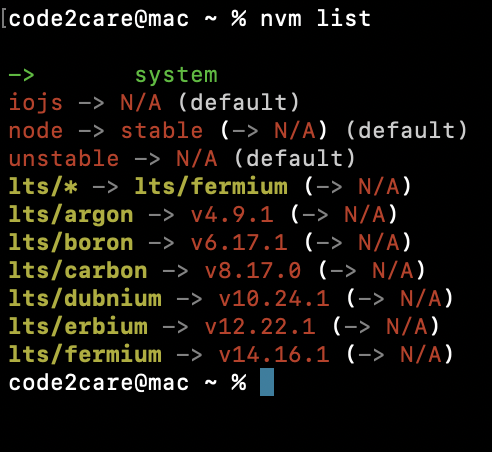
Install nvm using package manager
If you are making use of the zsh shell on other platforms, then you can try the below table to look for the appropriate command to install nvm package using the default command package manager.
| Operating System | Package Manager | Command to Install nvm |
|---|---|---|
| macOS | Homebrew | brew install nvm or curl -o- https://raw.githubusercontent.com/nvm-sh/nvm/v0.39.0/install.sh |
| Linux (Debian/Ubuntu) | apt-get | sudo apt-get install curl && curl -o- https://raw.githubusercontent.com/nvm-sh/nvm/v0.39.0/install.sh |
| Linux (CentOS/RHEL) | yum | sudo yum install curl && curl -o- https://raw.githubusercontent.com/nvm-sh/nvm/v0.39.0/install.sh |
| Windows | - | nvm-windows (download and run from official git repo https://github.com/coreybutler/nvm-windows) |
Provide Feedback For This Article
We take your feedback seriously and use it to improve our content. Thank you for helping us serve you better!
😊 Thanks for your time, your feedback has been registered!
Comments & Discussion
Facing issues? Have questions? Post them here! We're happy to help!