
If you have a file or a string that you want to replace every new line with a comma follow the below steps,
- Open the file in Sublime Text Editor,
Example file with multiple lines
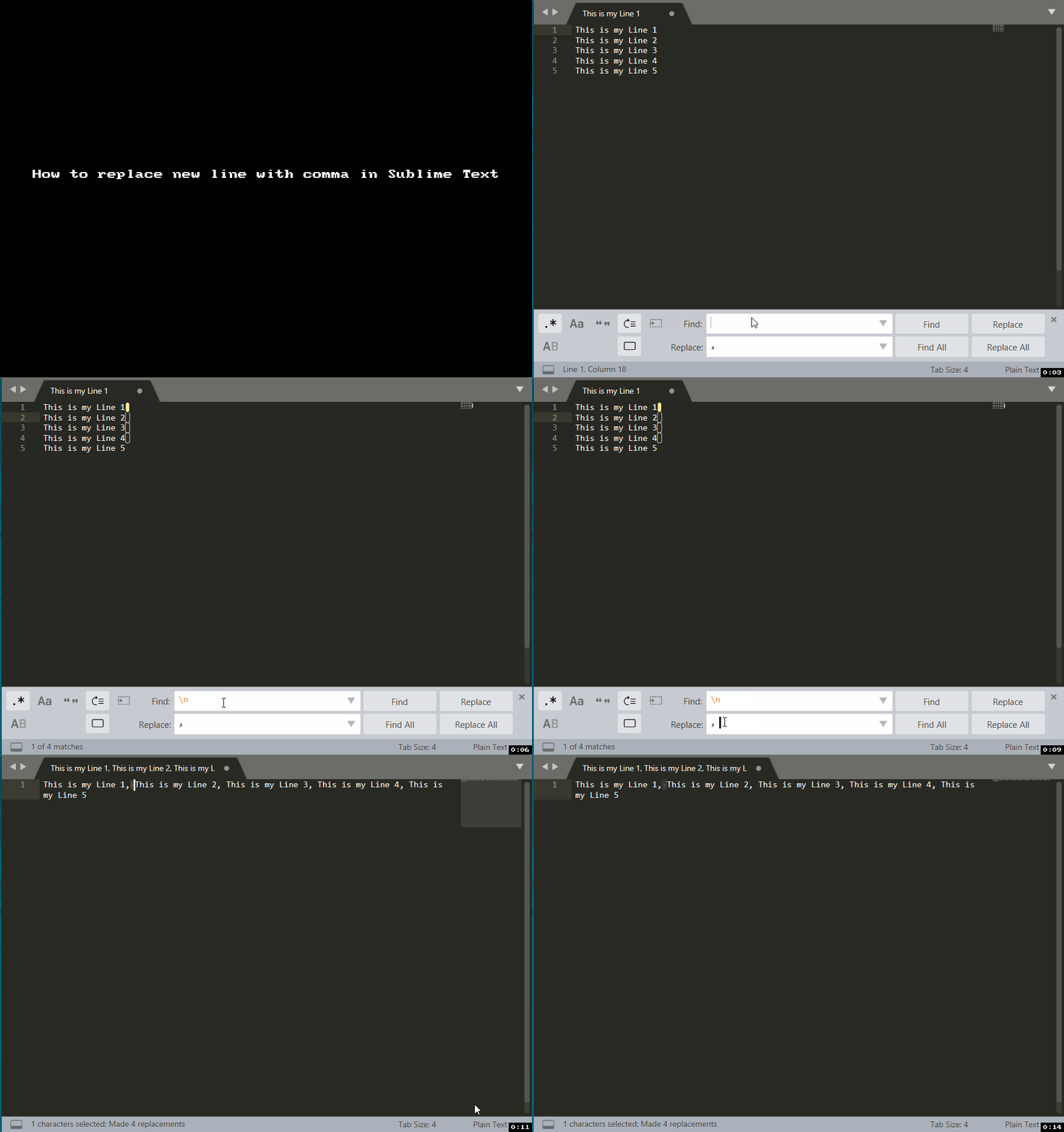
This is my Line 1 This is my Line 2 This is my Line 3 This is my Line 4 This is my Line 5 - Now press Control + H (or Command + H on macOS),
- Make sure you select .* button to enable RegEx,
- Now in Find: add \n (if windows encoding file) \r\n (if mac encoding)
- Add Replace: as "," (without the quotes).
- Click on REPLACE ALL! Thats it!
Output:
This is my Line 1,This is my Line 2,This is my Line 3,This is my Line 4,This is my Line 5⛏️ Note: If you want to a space after each comma, just add a space after the comma ", " in Replace.
Let's me give you a gif demo to make it easy to follow,
Provide Feedback For This Article
We take your feedback seriously and use it to improve our content. Thank you for helping us serve you better!
😊 Thanks for your time, your feedback has been registered!
Comments & Discussion
Facing issues? Have questions? Post them here! We're happy to help!