While trying to run an Android Application on an External Device (Connected Device) if you get the below error (working on Android Studio version 2.2.2)
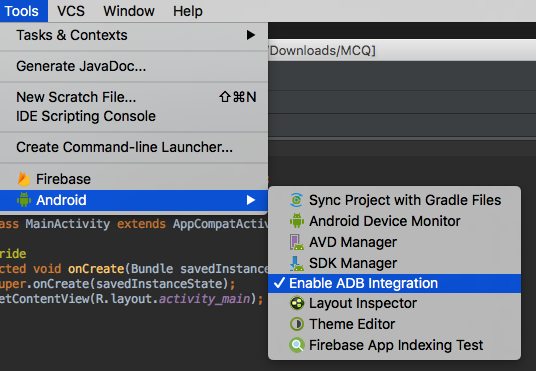
Instant Run requires 'Tools | Android | Enable ADB integration' to be enabled.
This error can be resolved by following the below steps:
- Make sure that the device is connected via USB and Debug mode is enabled.
- Goto Menu: Tools -> Android
- Click on "Enable ADB Integration"
- Your Connected device will be promoted with a dialog: "Allow USB debugging", click OK
- Now try to run the app: Run -> Run App

This is not an AI-generated article but is demonstrated by a human.
Please support independent contributors like Code2care by donating a coffee.
Buy me a coffee!
Comments & Discussion
Facing issues? Have questions? Post them here! We're happy to help!