
Below is a code snippet to perform batch update with plain JDBC.
import org.springframework.beans.factory.annotation.Autowired;
import org.springframework.boot.CommandLineRunner;
import org.springframework.jdbc.core.JdbcTemplate;
import org.springframework.stereotype.Component;

import java.util.ArrayList;
import java.util.List;

@Component
public class BatchUpdateRunner implements CommandLineRunner {

    @Autowired
    private JdbcTemplate jdbcTemplate;

    @Override
    public void run(String... args) throws Exception {

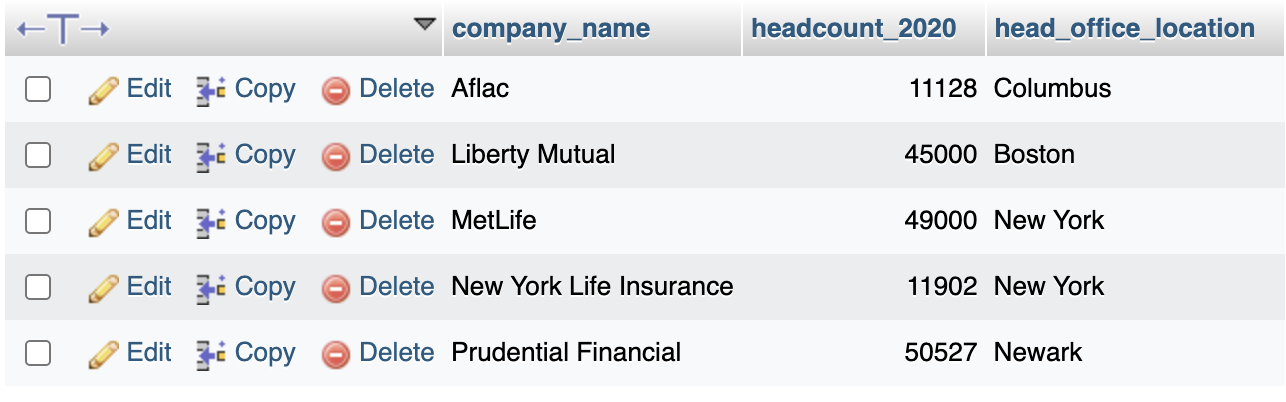
        List<InsuranceCompanies> companies = new ArrayList<>();
        companies.add(new InsuranceCompanies("MetLife", 49000, "New York"));
        companies.add(new InsuranceCompanies("Prudential Financial", 50527, "Newark"));
        companies.add(new InsuranceCompanies("New York Life Insurance", 11902, "New York"));
        companies.add(new InsuranceCompanies("Aflac", 11128, "Columbus"));
        companies.add(new InsuranceCompanies("Liberty Mutual", 45000, "Boston"));

        // Prepare the SQL insert statement
        String sql = "INSERT INTO insurance_companies (company_name, headcount_2020, head_office_location) VALUES (?, ?, ?)";


        List<Object[]> batchArgs = new ArrayList<>();
        for (InsuranceCompanies company : companies) {
            Object[] params = {company.getCompanyName(), company.getHeadcount2020(), company.getHeadOfficeLocation()};
            batchArgs.add(params);
        }


        jdbcTemplate.batchUpdate(sql, batchArgs); //batch Update
    }
}
Provide Feedback For This Article
We take your feedback seriously and use it to improve our content. Thank you for helping us serve you better!
😊 Thanks for your time, your feedback has been registered!
Comments & Discussion
Facing issues? Have questions? Post them here! We're happy to help!