
You may require to test how your Android Application behaves when the battery is low. The best way to do that is by setting the battery percentage in the Android Emulator.
- Open Emulator,
- Click on 3 dots to open: Extended Control
- Click on Battery,
- Change the level of batter using the slider bar.
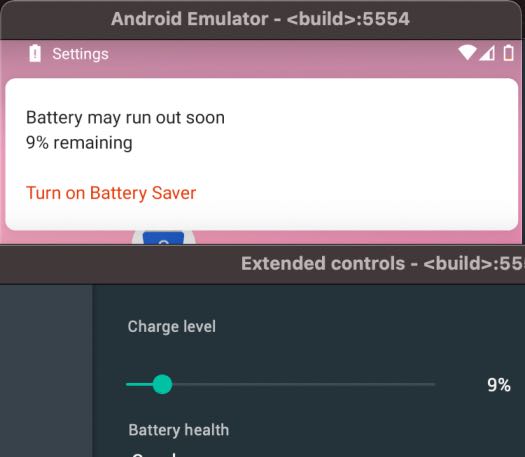
You will see that as you change the level of the battery, you will see the warning - "Battery may run out soon 9% remaining. Turn on Battery Saver."
You can even change other battery parameters such as - Battery health, Charger Connection, and Battery status.
Provide Feedback For This Article
We take your feedback seriously and use it to improve our content. Thank you for helping us serve you better!
😊 Thanks for your time, your feedback has been registered!
Comments & Discussion
Facing issues? Have questions? Post them here! We're happy to help!