In this tutorial, we will take a look at how to use Redis Database as a Cache for your Spring Boot Application.

Follow this tutorial for setting up Redis with Spring Boot: Link
Start typing to search commands...
Press Enter to search or Esc to close
In this tutorial, we will take a look at how to use Redis Database as a Cache for your Spring Boot Application.
Follow this tutorial for setting up Redis with Spring Boot: Link
In software development, caching really helps to improve the performance of the application and thus reduces the load on resources. In a Java application, caching can be used to store frequently accessed data in memory, thus making decreasing the latency of your application.
Redis is a one of the popular in-memory data store that can be used for caching in Java applications.
For this tutorial, we will use MySQL database as our primary database, we will keep the application simple so that it's easy to understand the concept of caching and the configuration.
applications.properties
#mySQL DB
spring.datasource.url=jdbc:mysql://localhost/jdbctest
spring.datasource.username=root
spring.datasource.password=
spring.jpa.hibernate.ddl-auto=update
spring.datasource.driver-class-name=com.mysql.cj.jdbc.Driver

#Redis as Cache
spring.cache.type=redis
spring.data.redis.url=redis://:password@redis-host.redislabs.com:port
spring.cache.redis.time-to-live=5sNote: Again! To keep it simple I am using Redis Cloud.
plugins {
	id 'java'
	id 'org.springframework.boot' version '3.0.6'
	id 'io.spring.dependency-management' version '1.1.0'
}

group = 'com.example'
version = '0.0.1-SNAPSHOT'
sourceCompatibility = '17'

repositories {
	mavenCentral()
}

dependencies {
	implementation 'org.springframework.boot:spring-boot-starter-data-redis'
	implementation 'org.springframework.boot:spring-boot-starter-web'
	implementation 'org.springframework.boot:spring-boot-starter-data-jpa'
	implementation 'org.springframework.boot:spring-boot-starter-validation'
	implementation 'org.jetbrains:annotations:23.0.0'
	implementation 'mysql:mysql-connector-java:8.0.14'

}

tasks.named('test') {
	useJUnitPlatform()
}
Keeping it really simple with an userId and userName fields.
package com.example.redisdemo;

import jakarta.persistence.Column;
import jakarta.persistence.Entity;
import jakarta.persistence.Id;

import java.io.Serializable;

@Entity
public class DbUser implements Serializable {

    private static final long serialVersionUID = 1L;

    public DbUser(int userId, String userName) {
        this.userId = userId;
        this.userName = userName;
    }

    public DbUser() {
    }

    @Id
    private int userId;

    @Column
    private String userName;

    public int getUserId() {
        return userId;
    }

    public void setUserId(int userId) {
        this.userId = userId;
    }

    public String getUserName() {
        return userName;
    }

    public void setUserName(String userName) {
        this.userName = userName;
    }


}
package com.example.redisdemo;

import io.lettuce.core.dynamic.annotation.Param;
import org.springframework.data.jpa.repository.JpaRepository;
import org.springframework.data.jpa.repository.Modifying;
import org.springframework.data.jpa.repository.Query;
import org.springframework.stereotype.Repository;

import java.util.Optional;

@Repository

public interface DbUserRepository extends JpaRepository<DbUser,Integer> {

    public Optional<DbUser> findUserByUserId(Integer userId);
    public DbUser save(DbUser user);


    @Modifying
    @Query("update DbUser u set u.userName = :userName where u.userId = :userId")
    void updateUserName(@Param("userId") Integer userId, @Param("userName") String userName);

    void deleteUserByUserId(Integer userId);
}package com.example.redisdemo;
import jakarta.transaction.Transactional;
import org.springframework.beans.factory.annotation.Autowired;
import org.springframework.cache.annotation.CacheConfig;
import org.springframework.cache.annotation.CacheEvict;
import org.springframework.cache.annotation.Cacheable;
import org.springframework.cache.annotation.EnableCaching;
import org.springframework.stereotype.Service;
import java.util.Optional;
@Service
@EnableCaching
@CacheConfig(cacheNames = "dbUsers")
public class UserService {
@Autowired
DbUserRepository dbUserRepository;
@Cacheable(key = "#userId",value = "dbUsers")
public Optional<DbUser> findUserByUserId(Integer userId) {
System.out.println("User fetched from Db!");
return dbUserRepository.findUserByUserId(userId);
}
public DbUser save(DbUser user) {
return dbUserRepository.save(user);
}
@Transactional
@CacheEvict(key = "#userId", value = "dbUsers")
public void updateUser(Integer userId, String userName) {
dbUserRepository.updateUserName(userId,userName);
}
@Transactional
@CacheEvict(key = "#userId", value = "dbUsers")
public void deleteUserByUserId(Integer userId) {
dbUserRepository.deleteUserByUserId(userId);
}
}
package com.example.redisdemo;

import org.springframework.beans.factory.annotation.Autowired;
import org.springframework.web.bind.annotation.*;

import java.util.Optional;


@RestController
public class UserController {

    @Autowired
    UserService userService;

    @Autowired
    FlushRedis flushRedis;

    @GetMapping(path = "/get-user/{userId}")
    public Optional<DbUser> getUserName(@PathVariable("userId") int userId) {
            return userService.findUserByUserId(userId);
    }

    @PostMapping(path = "/add-user")
    public void addUser(@RequestBody DbUser user) {
        System.out.println("User Saved!");
        userService.save(user);
    }

    @PostMapping(path = "/update-user")
    public void updateUSer(@RequestBody DbUser user) {
        System.out.println("User Saved!");
        userService.updateUser(user.getUserId(),user.getUserName());
    }

    @DeleteMapping(path = "/delete-user/{userId}")
    public void deleteUSer(@PathVariable("userId") int userId) {
        System.out.println("User Saved!");
        userService.deleteUserByUserId(userId);
    }

}
As you may see we have performed all CRUD operations using Spring Data JPA + MySQL, as well as made use of Redis as Cache to be in Sync with our data.
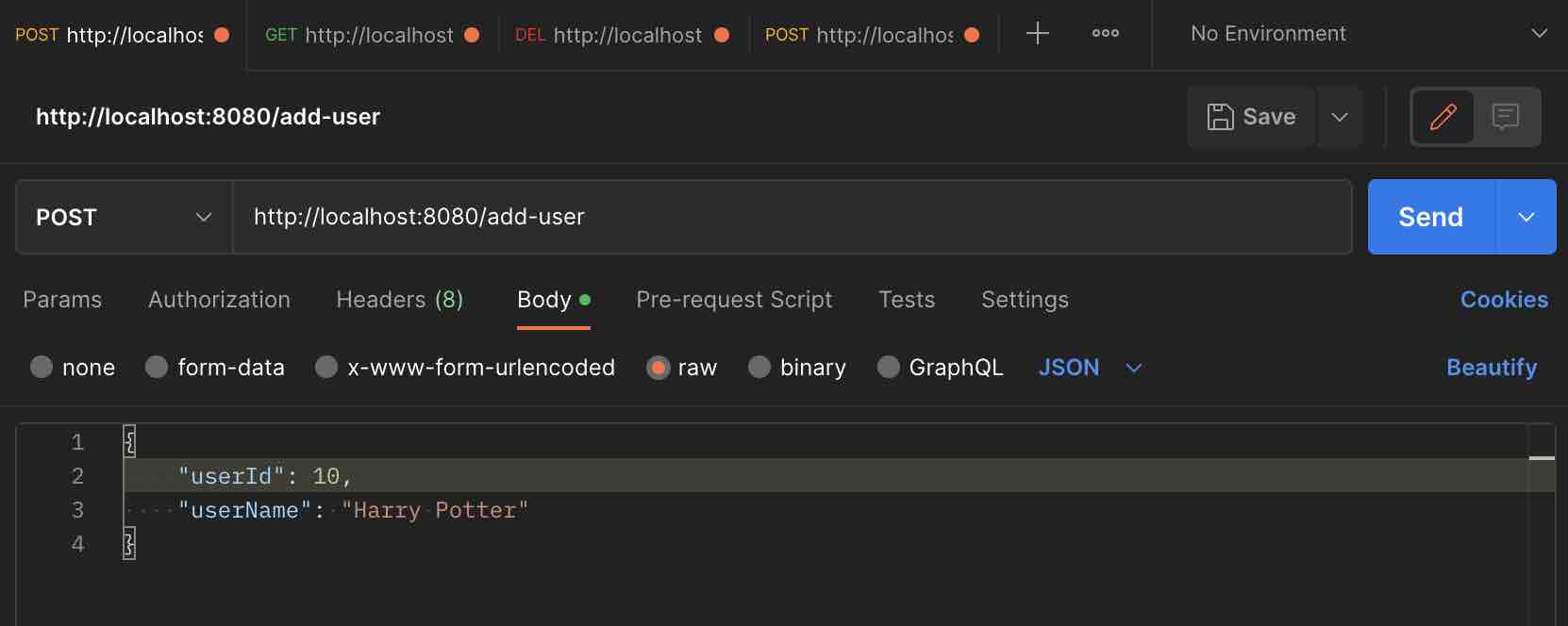
curl --location 'http://localhost:8080/add-user' \
--header 'Content-Type: application/json' \
--data '{
    "userId": 10,
    "userName": "Harry"
}'curl --location 'curl --location 'http://localhost:8080/get-user/10' \
--header 'Content-Type: application/json''curl --location 'curl --location 'http://localhost:8080/update-user' \
--header 'Content-Type: application/json' \
--data '{
"userId":10,
"userName":"Ron"
}''curl --location --request DELETE 'http://localhost:8080/delete-user/10'You may also use clients like Postman to perform these API calls.
We take your feedback seriously and use it to improve our content. Thank you for helping us serve you better!
😊 Thanks for your time, your feedback has been registered!
Comments & Discussion
Facing issues? Have questions? Post them here! We're happy to help!