
If you want to display a Java Date in GMT (UTC) timezone then you need follow the below steps,
- Create a Date object: Date currentDate = new Date();
- Create a SimpleDate object: DateFormat dateFormat = new SimpleDateFormat("yyyy/MM/dd HH:mm");
- Now set timezone to DateFormat object: dateFormat.setTimeZone(TimeZone.getTimeZone("GMT"));
- Now when you apply the dataFormat to the currentDate object, you will get the time printed in GMT: System.out.println(dateFormat.format(currentDate));
package org.code2care;

import java.text.DateFormat;
import java.text.SimpleDateFormat;
import java.util.Date;
import java.util.TimeZone;

public class Main {

    public static void main(String[] args) {

        Date currentDate = new Date();
        DateFormat dateFormat = new SimpleDateFormat("yyyy/MM/dd HH:mm:ss");
        System.out.println("Local Time: " + dateFormat.format(currentDate));
        dateFormat.setTimeZone(TimeZone.getTimeZone("GMT"));
        System.out.println("Time in GMT: " + dateFormat.format(currentDate));

    }

}
Local Time: 2021/03/27 04:25:50
Time in GMT: 2021/03/27 09:25:50
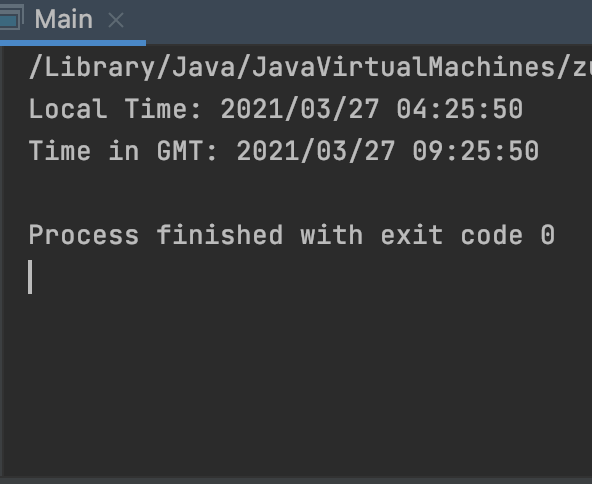
By default when you create a Date object instance in Java you will get the time in the TimeZone that you have set on your device. Say you write a piece of code on your computer and you live in Chicago, your default system time zone will be America/Chicago (CST/CDT)
    public static void main(String[] args) {
        Date currentDate = new Date();
        DateFormat dateFormat = new SimpleDateFormat("yyyy/MM/dd HH:mm:ss");
        System.out.println(dateFormat.format(currentDate));
}2021/03/26 15:00:00.000-05:00
If your server is hosted in New York, then when the same code runs the output will be of America/New_York timezone,
2021/03/26 15:00:00.000-04:00
Have Questions? Post them here!
Provide Feedback For This Article
We take your feedback seriously and use it to improve our content. Thank you for helping us serve you better!
😊 Thanks for your time, your feedback has been registered!
Comments & Discussion
Facing issues? Have questions? Post them here! We're happy to help!