
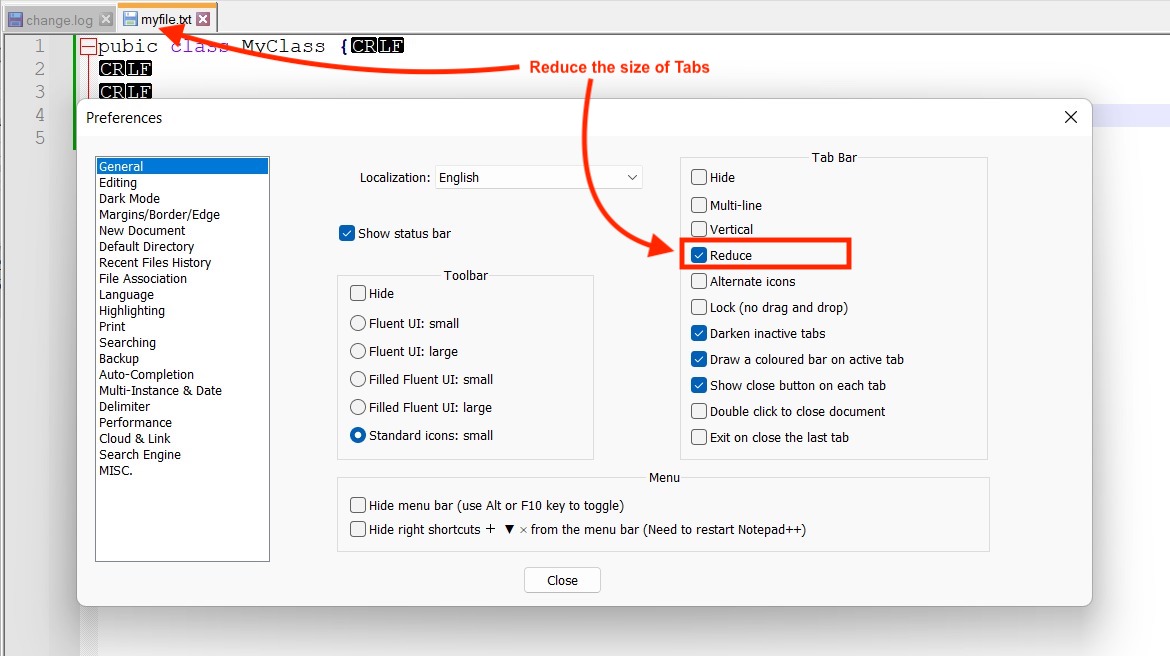
If you are that person who works on a lot of files open on Notepad++ that you may have to scroll the tabs to enable multi-line tabs to see them all. Well, there is a way to make these tabs be displayed smaller in size with smaller icons so you get more real estate.
- Go to Notepad++ Menu: Settings -> Preferences...
- Now Select General Tab in the Side Bar.
- Check the "Reduce" checkbox.
- Click close button.
Provide Feedback For This Article
We take your feedback seriously and use it to improve our content. Thank you for helping us serve you better!
😊 Thanks for your time, your feedback has been registered!
Comments & Discussion
Facing issues? Have questions? Post them here! We're happy to help!