
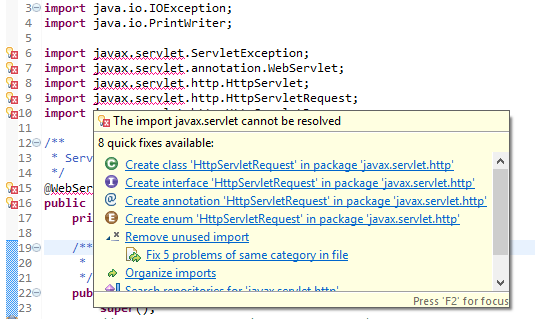
If you receive the above error message in your Java files (servlet classes) while working with Eclipse IDE, you are likely missing the servlet-api.jar file that is required by your project.
How to Resolve javax.servlet Error
- Ensure that you have installed Apache Tomcat Server and configured it to run your application.
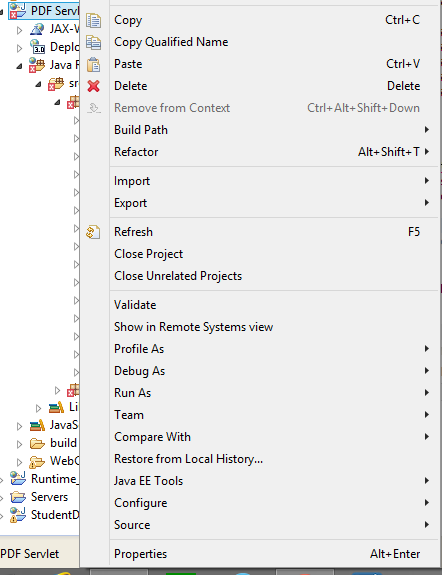
- Right-click on your project folder.
- Select Properties from the context menu.
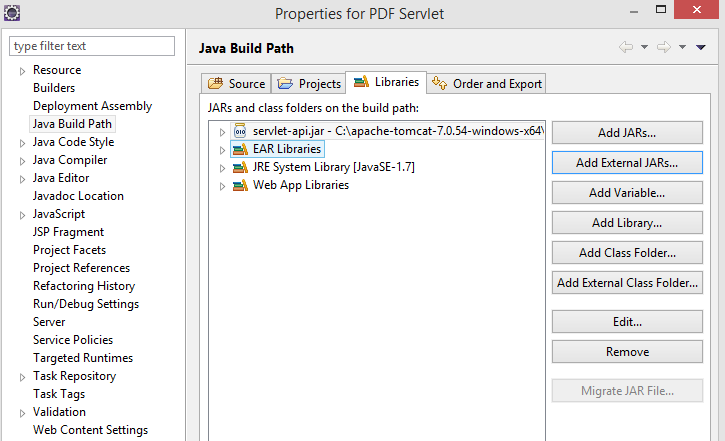
- Select Java Build Path from the options on the right.
- Navigate to the Libraries tab.
- Click on Add External JARs.
- Locate the directory where Apache Tomcat is installed (e.g., c:\apache-tomcat-7.0.101).
- Open the lib directory and select the servlet-api.jar file.
- Apply the changes and save.
- Clean and build your project.
- The errors should now be resolved.
Note: Alternatively, you can copy the servlet-api.jar file to the lib folder of your project.
package com.code2care.org;
import javax.servlet.*;
import javax.servlet.http.*;
import java.io.PrintWriter;
import java.io.IOException;
public class ServletError extends HttpServlet {
/**
* HTTP doGet request.
*/
public void doGet(HttpServletRequest request, HttpServletResponse response)
throws ServletException, IOException {
response.setContentType("text/html");
PrintWriter out = response.getWriter();
out.println("<html>");
out.println("<head><title>Resolving Servlet Jar Exception</title></head>");
out.println("<body>");
out.println("<p>GET: This works!</p>");
out.println("</body></html>");
out.close();
}
/**
* HTTP doPost request.
*/
public void doPost(HttpServletRequest request, HttpServletResponse response)
throws ServletException, IOException {
response.setContentType("text/html");
PrintWriter out = response.getWriter();
out.println("<html>");
out.println("<head><title>Resolving Servlet Jar Exception</title></head>");
out.println("<body>");
out.println("<p>POST: This works!</p>");
out.println("</body></html>");
out.close();
}
}
Provide Feedback For This Article
We take your feedback seriously and use it to improve our content. Thank you for helping us serve you better!
😊 Thanks for your time, your feedback has been registered!
Comments & Discussion
Facing issues? Have questions? Post them here! We're happy to help!