
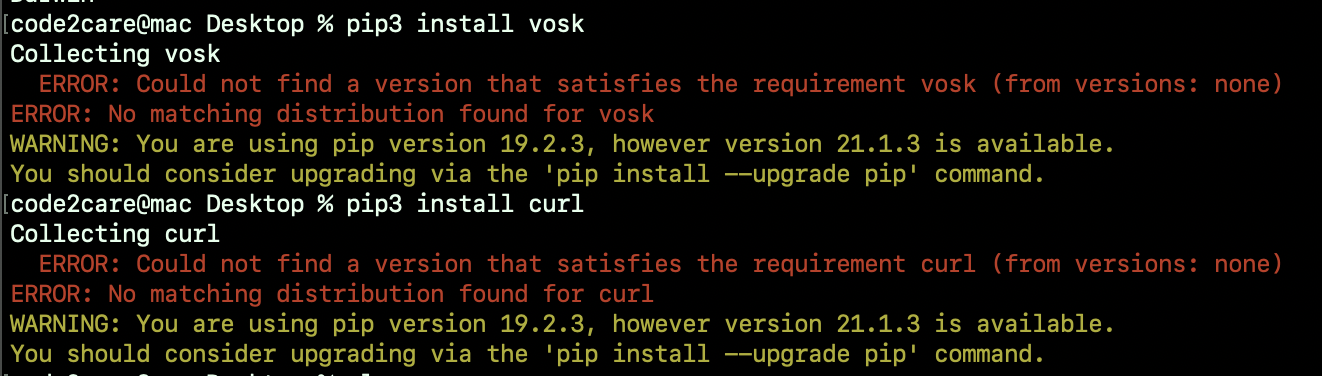
WARNING: You are using pip version 19.2.3, however, version 21.1.3 is available.
You should consider upgrading via the 'pip install --upgrade pip' command.
You might see the above warning message when you run pip or pip3 commands on your terminal if your pip version is not the latest one. As the warning suggests you need to upgrade to the latest version to get this warning go away by simply running the command "pip install --upgrade pip"
code2care@mac Desktop % pip3 install --upgrade pip
Collecting pip
  Downloading https://files.pythonhosted.org/packages/47/ca/cdd0862ca933f751dd/pip-21.1.3-py3-none-any.whl (1.5MB)
     |█████| 1.6MB 909kB/s
Installing collected packages: pip
  Found existing installation: pip 19.2.3
    Uninstalling pip-19.2.3:
ERROR: Could not install packages due to an EnvironmentError: [Errno 13] Permission denied: 'RECORD'
Consider using the `--user` option or check the permissions.
⛏️ If you are using pip3 package installer then use the command "pip3 install --upgrade pip" and you might get an error - Permission denied, so used --user along with the command to fix it.
Have Questions? Post them here!
Provide Feedback For This Article
We take your feedback seriously and use it to improve our content. Thank you for helping us serve you better!
😊 Thanks for your time, your feedback has been registered!
Comments & Discussion
Facing issues? Have questions? Post them here! We're happy to help!