
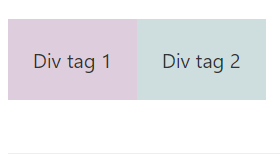
By default, if you create two div elements in HTML code, they are placed one below the other. If you want to place them next to each other you would require to use a CSS property float.
✏️ Syntax: float: left | right | none | inherit
As the name goes the float property specifies how an element should float in the webpage on the left or the right!.
Values that a float property can have areas below,
- left - The element will float left w.r.t to its container
- right - The element will float right w.r.t to its container
- none - This is the default behavior.
- inherit - The element will inherit parent float property value.
Let's see an example: We create two div's next to each other without float property
<div id="div1" style="padding:20px;background-color:#decddd">Div tag 1</div>
<div id="div2" style="padding:20px;background-color:#cedddd">Div tag 2</div>
Output:
Now lets use float property,
<div id="wrapperDiv">
<div id="div1" style="padding:20px;background-color:#decddd;float:left">Div tag 1</div>
<div id="div2" style="padding:20px;background-color:#cedddd;float:left">Div tag 2</div>
</div>
Output:
Comments:
- Having to place two divs side by side in HTML is what I was struggling to achieve. Thank you! this helped
anon 23 Sept 2020 11:11:21 GMT
- THANK YOU! THIS IS WHAT I WAS LOOKING FOR!!! Short & Sweet!
apk20 04 Aug 2020 12:08:26 GMT
- Further comments disabled!
Comments & Discussion
Facing issues? Have questions? Post them here! We're happy to help!
Provide Feedback For This Article
We take your feedback seriously and use it to improve our content. Thank you for helping us serve you better!
😊 Thanks for your time, your feedback has been registered!