
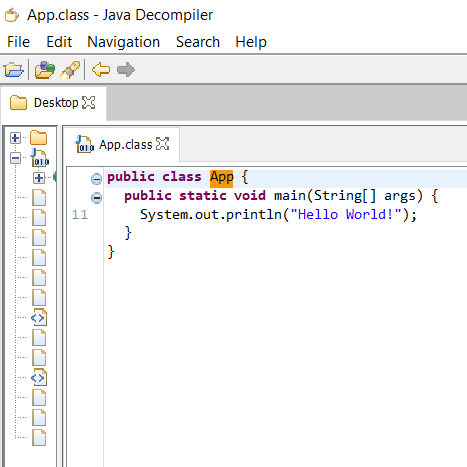
While debugging Java code, we all require a decompiler to see what the Java code looks like for a Java .class file or a bundled jar file. If you are looking for such a utility, you can get the Java Decompiler
This unity is free to use and works as a standalone executable jar file, so you can use it on Windows, macOS as well as Linux/Unix systems. It will open JD-GUI, which is a standalone GUI utility that displays Java source codes of ".class" files.
Some features of JD:
- The decompiler core is been written in Java<./li>
- Has a GUI.
- It supports: JDK 1.1.8, JDK 1.3.1, JDK 1.4.2, JDK 1.5.0, JDK 1.6.0, JDK 1.7.0, JDK 1.8.0, JDK 9.0.1, JDK 10.0.2
- Has a Eclipse plugin.
- Supports .class, .jar, .war, .ear, .aar, .kar, .jmod & .zip files.
- Syntax Highligting.
Link: http://java-decompiler.github.io/
Git Hub Project: https://github.com/java-decompiler/jd-gui/releases
Related Questions:
- How to decomplie Java Jar or War file?
- How to decomplie Java code?
- Free Java .class file decompliler?
- Java decompiler application?
- Java decompiler plugin?
Have Questions? Post them here!
Provide Feedback For This Article
We take your feedback seriously and use it to improve our content. Thank you for helping us serve you better!
😊 Thanks for your time, your feedback has been registered!
Comments & Discussion
Facing issues? Have questions? Post them here! We're happy to help!