There are 4 different types of cases you can convert the text in Sublime Text Editor 3,
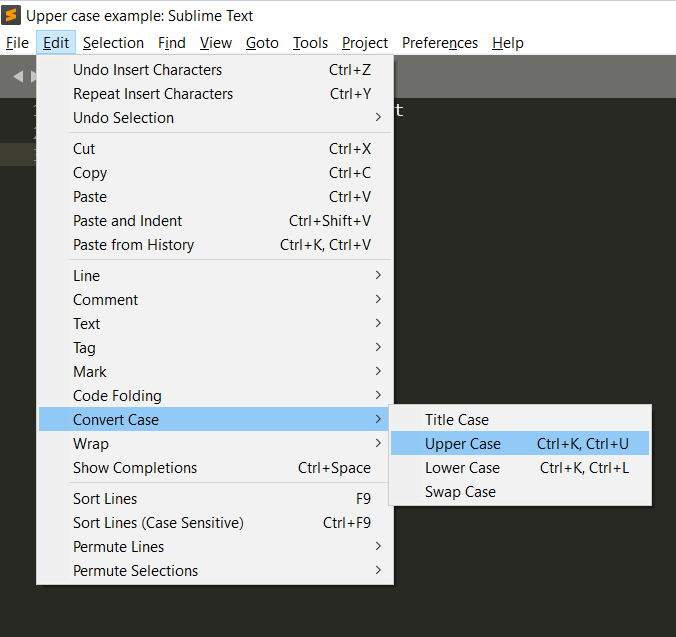
Upper Case Conversion:
- Be on the tab you want to do upper case conversion.
- Select the text you want to convert (if you want to do it for the entire file, you can use Ctrl + A on Windows, or Command + A if using macOS to select all text)
- Now go Menu: Edit → Convert Case → Upper Case.
- Your selected text will get converted in upper case.
Before: This sample TEXT needs to be converted into upper caseAfter : THIS SAMPLE TEXT NEEDS TO BE CONVERTED INTO UPPER CASE⛏️ You can also use keyboard shortcut: Ctrl+K, Ctrl+U on Windows OS (Command ⌘ + K followed by Command ⌘ + U on macOS) for upper case conversion
Lower Case Conversion:
- Select the text in the tab/file you want to convert to Lower case.
- Goto Menu: Edit → Convert Case → Lower Case.
- Your selected text will get converted in lower case.
Before: This sample TEXT needs to be converted into LOWER caseAfter : this sample text needs to be converted into lower case⛏️ You can also use keyboard shortcut: Ctrl+K, Ctrl+L on Windows OS (Command ⌘ + K followed by Command ⌘ + L on macOS) for lower case conversion
Title Case Conversion:
- Select the text in the tab/file you want to convert to Title case.
- Goto Menu: Edit → Convert Case → Title Case.
- Your selected text will get converted in title case.
Before: This sample TEXT needs to be converted into Title caseAfter : This Sample Text Needs To Be Converted Into Title CaseSwap Case Conversion:
- Select the text in the tab/file you want to convert to Swap case.
- Goto Menu: Edit → Convert Case → Swap Case.
- Your selected text will get converted in swap case.
Before: This sample TEXT needs to be converted into SWAP caseAfter : tHIS SAMPLE text NEEDS TO BE CONVERTED INTO swap CASEHave prepared a GIF Image to demonstrate to Upper and to Lower cases using Keyboard shortcuts.


This is not an AI-generated article but is demonstrated by a human.
Please support independent contributors like Code2care by donating a coffee.
Buy me a coffee!
Comments & Discussion
Facing issues? Have questions? Post them here! We're happy to help!