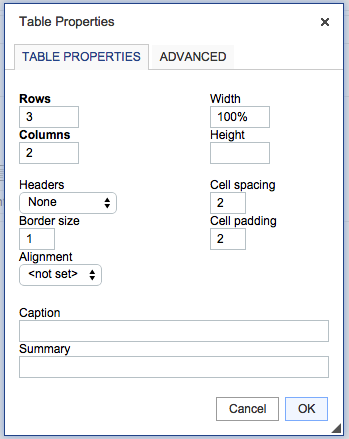
If you want to make your CKEditor table responsive you need to set the table width in percentage rather than a fixed px or em value. By default, the table width value is set to 500 px. To change this value you need to add the following code in config.xml file.
/**
 * @license Copyright (c) 2003-2015, CKSource - Frederico Knabben. All rights reserved.
 * For licensing, see LICENSE.md or http://ckeditor.com/license
 */


CKEDITOR.on('dialogDefinition', function( ev ) {

	  var diagName = ev.data.name;
	  var diagDefn = ev.data.definition;

	  if(diagName === 'table') {
	    var infoTab = diagDefn.getContents('info');

	    var width = infoTab.get('txtWidth');
	    width['default'] = "100%";


	  }
});
The above code will set the Table's default width to 100% instead of 500 as previously set.

This is not an AI-generated article but is demonstrated by a human.
Please support independent contributors like Code2care by donating a coffee.
Buy me a coffee!
Comments & Discussion
Facing issues? Have questions? Post them here! We're happy to help!