
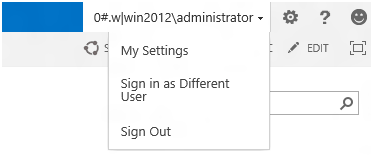
The "Sign in as Different User" menu option is very useful when testing your SharePoint applications, but it can lead to problems especially when opening documents, say in Microsoft Word.
So, it may be for these reasons that the option has been removed in SharePoint 2013.
You can add the menu item back. But I suggest only doing this in the Test/UAT/Development/QA SharePoint servers.
Perform this step on all servers in your SharePoint FARM:
- Locate the file HIVE\TEMPLATE\CONTROLTEMPLATES\Welcome.ascx and open in a text editor, Notepad++ is my favorite. You can user Visual Studio, SharePoint Designer for formatting.
- Add the following element before the existing element with the id of "ID_RequestAccess"
- Save the file, Now, the menu item shall be displayed as expected.
- Make sure you perform this on all web front end servers in the SharePoint FARM.
<SharePoint:MenuItemTemplate runat="server" ID="ID_LoginAsDifferentUser"
 Text="<%$Resources:wss,personalactions_loginasdifferentuser%>"
 Description="<%$Resources:wss,personalactions_loginasdifferentuserdescription%>"
 MenuGroupId="100"
 Sequence="100"
 UseShortId="true"
 />
Provide Feedback For This Article
We take your feedback seriously and use it to improve our content. Thank you for helping us serve you better!
😊 Thanks for your time, your feedback has been registered!
Comments & Discussion
Facing issues? Have questions? Post them here! We're happy to help!