
Eclipse IDEs come with a spellcheck feature that is disabled by default. Spellcheck would be quite useful to the developer when writing html pages or even comments.
Here is how we can enable Spellcheck in Eclipse
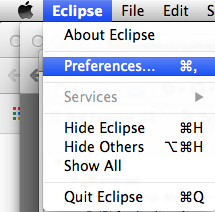
Goto Eclipse -> Preferences
Under Editor -> Text Editor -> Spellings .... Select Enable spell checking

Thats it! .... Now when we open any file we can see spellcheck feature working!

Provide Feedback For This Article
We take your feedback seriously and use it to improve our content. Thank you for helping us serve you better!
😊 Thanks for your time, your feedback has been registered!
Comments & Discussion
Facing issues? Have questions? Post them here! We're happy to help!