
In Android Programming we have AlertDialogs the way we have HTML. We can have OK and CANCEL buttons with and Title and text messages/info.
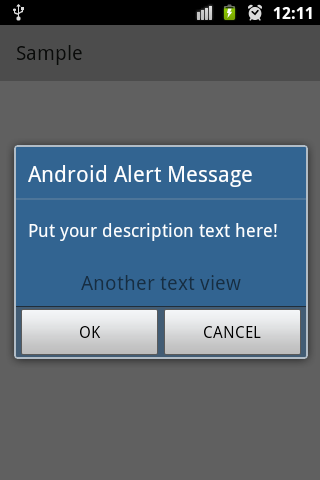
1. Create an object of AlertDialog.Builder from android.app.AlertDialog package.
AlertDialog.Builder alertDialog = new AlertDialog.Builder(this);
2. Set the Title for the Alert Dialog using setTitle() method.
alertDialog.setTitle("Android Alert Message");
3. Set the Message for the Alert Dialog using setTitle() method.
alertDialog.setMessage("Put your description text here!");
4. Now if you want to add some other views you can add them to a custom Layout without the Alert Dialog. So lets create a LinearLayout and set its orientation as Vertical.
LinearLayout diagLayout = new LinearLayout(this);
diagLayout.setOrientation(LinearLayout.VERTICAL);
5. Now lets create a TextView and set its text using setText() and add attributes like padding, gravity and setTextSIze using setPadding(), setGravity() and setTextView() respectively.
TextView text = new TextView(this); text.setText("Another text view");
text.setPadding(10, 10, 10, 10);
text.setGravity(Gravity.CENTER);
text.setTextSize(20);Provide Feedback For This Article
We take your feedback seriously and use it to improve our content. Thank you for helping us serve you better!
😊 Thanks for your time, your feedback has been registered!
Comments & Discussion
Facing issues? Have questions? Post them here! We're happy to help!