
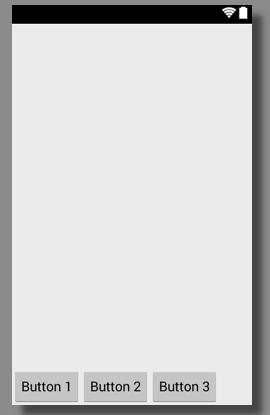
If you want to add Buttons to the bottom of your android layout XML file you can achieve it using attribute layout_gravity on LinearLayout or TableRow layout.
Below your Parent Layout tag add a LinearLayout or TableRow with attribute android:layout_gravity="bottom". This will move this sub-view holding buttons or other views at the bottom.
Code :<LinearLayout xmlns:android="http://schemas.android.com/apk/res/android"
xmlns:tools="http://schemas.android.com/tools"
android:layout_width="match_parent"
android:layout_height="match_parent"
tools:context="com.example.drawing.Sample"
tools:ignore="HardcodedText" >
<TableRow
android:id="@+id/tableRow1"
android:layout_width="fill_parent"
android:layout_height="wrap_content"
android:layout_gravity="bottom"
android:layout_marginTop="15dp" >
<Button
android:id="@+id/button1"
android:layout_width="wrap_content"
android:layout_height="wrap_content"
android:text="Button 1" />
<Button
android:id="@+id/button2"
android:layout_width="wrap_content"
android:layout_height="wrap_content"
android:text="Button 2" />
<Button
android:id="@+id/button3"
android:layout_width="wrap_content"
android:layout_height="wrap_content"
android:text="Button 3" />
</TableRow>
</LinearLayout>Provide Feedback For This Article
We take your feedback seriously and use it to improve our content. Thank you for helping us serve you better!
😊 Thanks for your time, your feedback has been registered!
Comments & Discussion
Facing issues? Have questions? Post them here! We're happy to help!