
There are multiple ways in which you can know your IP address (internal and external) on Mac running on macOS Ventura 13.0,
Using System Settings
- Click on the Apple Menu:
- Select System Settings...,
- Select Network from the side menu,
- If you are connected to Wifi - click on the Wi-Fi,
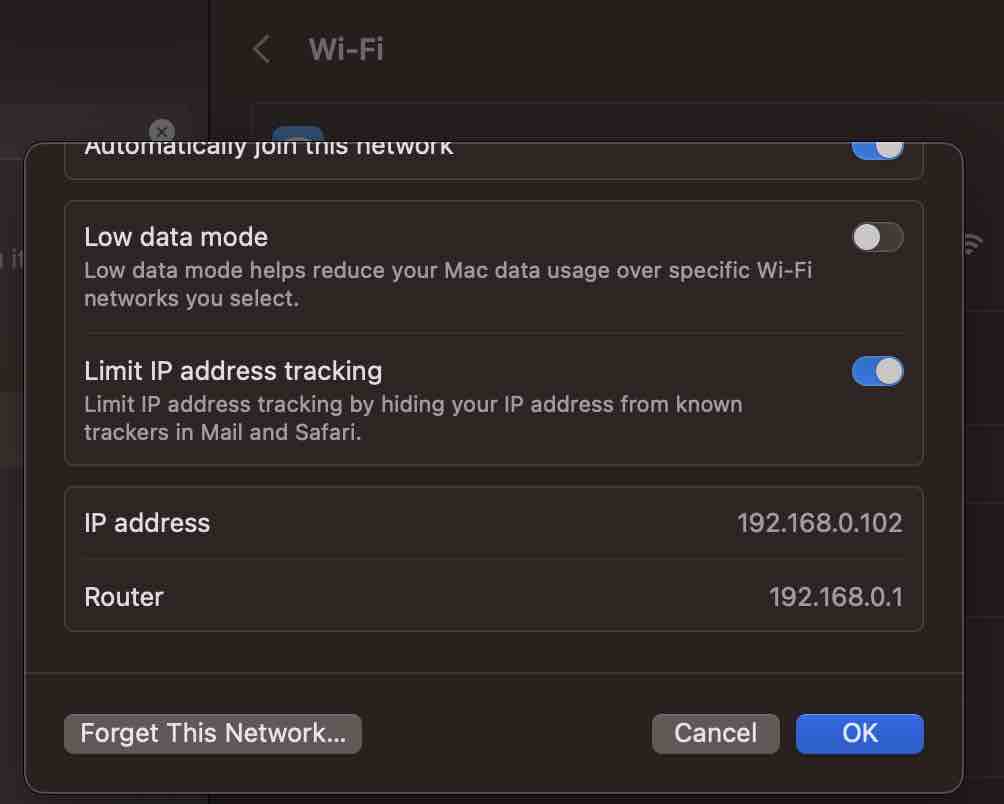
- Click on the 3 dots next to the Network you are connected and select Network Settings...
- You will see your IP address as well as your Routers
Using Terminal Command
- Open Terminal App,
- Type command: ipconfig getifaddr en0
- You should see your internal IP addess.
How to know External IP Address
- Open Terminal App,
- Type command: curl checkip.dyndns.org
- You should see your external (Internet) IP addess.
Provide Feedback For This Article
We take your feedback seriously and use it to improve our content. Thank you for helping us serve you better!
😊 Thanks for your time, your feedback has been registered!
Comments & Discussion
Facing issues? Have questions? Post them here! We're happy to help!