
mysql> desc my_uat.students;
+-----------------+-------------+------+-----+---------+----------------+
| Field           | Type        | Null | Key | Default | Extra          |
+-----------------+-------------+------+-----+---------+----------------+
| student_id      | int         | NO   | PRI | NULL    | auto_increment |
| student_name    | varchar(45) | NO   |     | NULL    |                |
| student_dob     | datetime    | NO   | PRI | NULL    |                |
| student_address | varchar(45) | NO   |     | NULL    |                |
+-----------------+-------------+------+-----+---------+----------------+
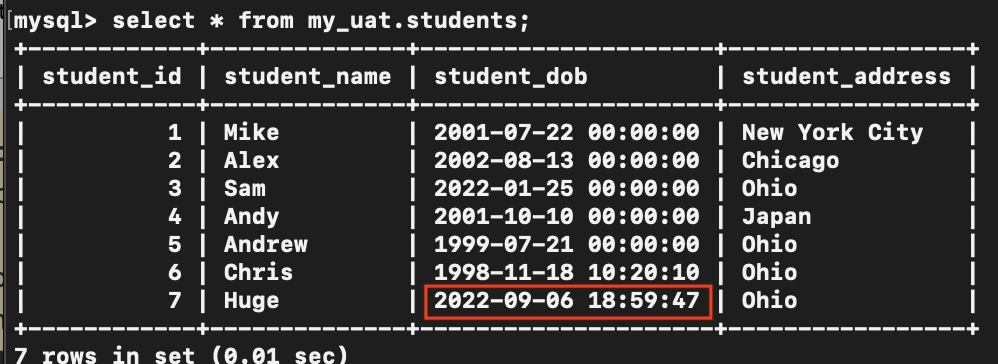
As you can see in the above students table I have a filed student_dob declared as datetime, in this example, we will see how to insert a timestamp into this field using JDBC PreparedStatement,
Code Example:
String url ="jdbc:mysql://localhost:3306/my_db";
String userName="root";
String password ="root123";
String insertQuery ="insert into students values(?,?,?,?)";

Connection connection = DriverManager.getConnection(url,userName,password);
PreparedStatement preparedStatement = connection.prepareStatement(insertQuery);
preparedStatement.setString(1, null);
preparedStatement.setString(2, "Huge");

preparedStatement.setObject(3,Instant.now());

preparedStatement.setString(4, "Ohio");
int result = preparedStatement.executeUpdate();
As you can see we have made use of the Java 8 Instance (Date and Time API) class in order to insert a timestamp into the Database using PreparedStatement setObject method.
Provide Feedback For This Article
We take your feedback seriously and use it to improve our content. Thank you for helping us serve you better!
😊 Thanks for your time, your feedback has been registered!
Comments & Discussion
Facing issues? Have questions? Post them here! We're happy to help!