
Things have changed a bit when it comes to navigating on the new macOS Ventura, if you want to enable or disable Dark Mode on your Mac, you can Open Spotlight Search and type "System Settings", go to Apperance and select among the Light, Dark or Auto Options.
Steps in detail:- Click on the Apple Logo on the Menu,
- Select System Settings...,
- Now, Go to Apperance,
- Here you will see 3 options,
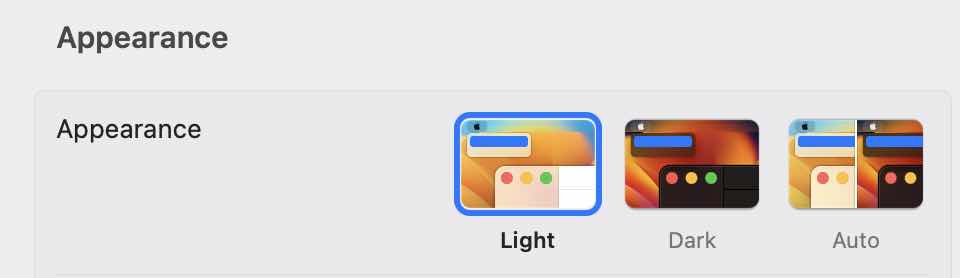
- Ligth: To move to Light Mode.
- Dark: To move to Dark Mode.
- Auto: To automatically toggle between light and dark mode based on the time of the day and your location.
Provide Feedback For This Article
We take your feedback seriously and use it to improve our content. Thank you for helping us serve you better!
😊 Thanks for your time, your feedback has been registered!
Comments & Discussion
Facing issues? Have questions? Post them here! We're happy to help!